# Agent Handoff Kit
[繁體中文](README.md) · [Getting started](https://adamchanadam.github.io/agent-handoff-kit/agent-handoff-kit-intro.en.html) · [Practical guide](https://adamchanadam.github.io/agent-handoff-kit/agent-handoff-kit-guide.en.html) · [AI install page](https://adamchanadam.github.io/agent-handoff-kit/agent-handoff-kit-ai-install.en.html)
Source package version: `v0.3.56`. npm `@latest` and GitHub Release are verified by post-publish readback.
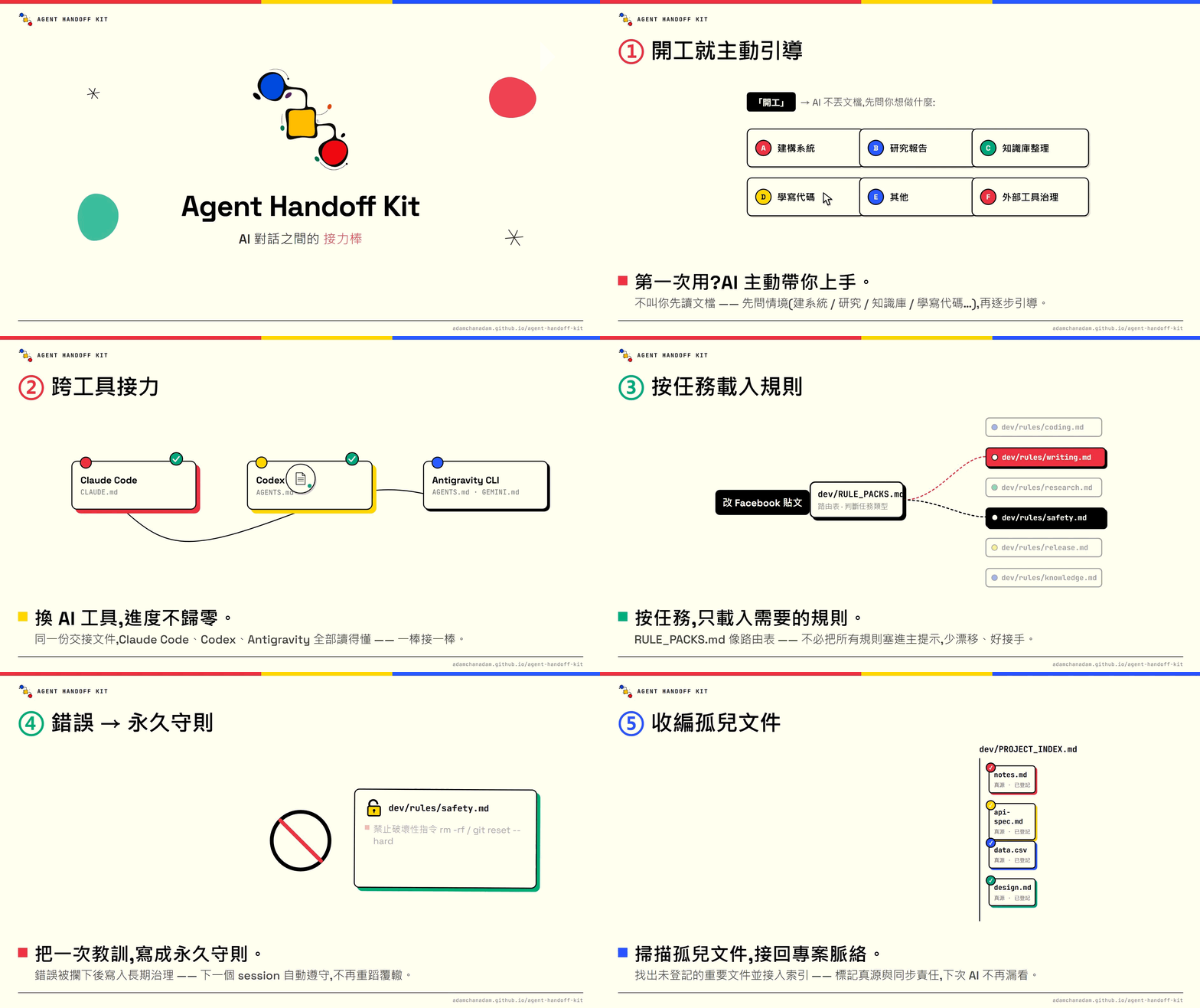
Agent Handoff Kit is a **handoff baton between AI conversations**.
It solves one narrow but important problem: AI conversations forget. A new conversation may not know where the last one stopped, which new files or reference sources matter, what is safe to change, or which document is authoritative. The kit keeps the current state, next action, risks, file routes, and the next-session prompt in the project so the next local AI can continue honestly.
📌 You describe the outcome you want. An AI that can read and write the local folder confirms the folder, decides whether to install or upgrade, runs the technical checks, and explains the result. You do not need to learn npm commands or diagnose file conflicts.
## 🚀 Start in three steps
For a first use, do not start by reading every technical detail. Do these three things:
1. Open a local AI agent in the folder where you want to use Agent Handoff Kit and send:
```text
Read https://adamchanadam.github.io/agent-handoff-kit/agent-handoff-kit-ai-install.en.html and install or upgrade Agent Handoff Kit in this folder.
```
You can also open the [AI install page](https://adamchanadam.github.io/agent-handoff-kit/agent-handoff-kit-ai-install.en.html) first to see the procedure the AI must follow.
2. When installation finishes, say `Start Agent Handoff` or `開工` to the AI.
3. When you are genuinely ending this work session, say `wrap up` or `收工`.
You do not decide whether the folder needs an install, upgrade, health check, or a safe stop. The AI must show the folder it sees, explain risk and the next action, and ask when your confirmation is needed.
If the folder already contains older Kit files or AI memory files such as `AGENTS.md`, `CLAUDE.md`, or `GEMINI.md`, use the same request. The AI inspects first; it must not silently overwrite them.
For a non-technical introduction, open the [English introduction](https://adamchanadam.github.io/agent-handoff-kit/agent-handoff-kit-intro.en.html). For complete walkthroughs, open the [English practical guide](https://adamchanadam.github.io/agent-handoff-kit/agent-handoff-kit-guide.en.html).
To see how Agent Handoff Kit sits in a local agentic AI workflow, open [`local-agentic-ai-workflow-case-study.en.html`](https://adamchanadam.github.io/agent-handoff-kit/local-agentic-ai-workflow-case-study.en.html).
## 🐱 How to read the status card
| Status | Meaning |
|---|---|
| `( o.o ) continuity ready` | Ready to continue; the AI has loaded resumable state. |
| `( -.- ) handoff saved` | Closeout has been saved; next time you can say `Start Agent Handoff` or `開工`. |
| `( x.x ) handoff blocked` | Not broken; something still needs to be saved, committed, verified, or handled. Follow the Blocker line first and do not treat this session as handed off. |
## 🧭 How to read this repository
If you only want to use the kit, start from these four pages:
| Entry | Purpose |
|---|---|
| [This README](README.en.md) | Product purpose, safe use, and boundaries. |
| [60-second introduction](https://adamchanadam.github.io/agent-handoff-kit/agent-handoff-kit-intro.en.html) | A non-technical overview. |
| [Practical guide](https://adamchanadam.github.io/agent-handoff-kit/agent-handoff-kit-guide.en.html) | Three detailed scenarios: everyday local work, research with external tools, and a long-lived project. |
| [AI install page](https://adamchanadam.github.io/agent-handoff-kit/agent-handoff-kit-ai-install.en.html) | The instructions an AI follows to install, upgrade, check, or stop safely. |
This public repository keeps the material needed for use, installation, GitHub Pages, and the npm runtime. Normal users only need the four entries above.
## 🔎 What problem does it solve?
Long-running work with AI commonly has five problems:
| Problem | What Agent Handoff Kit does |
|---|---|
| A new AI does not know the current state | Keeps `dev/SESSION_HANDOFF.md` with the current objective, risks, validation, and next action. |
| New files or reference sources become disconnected | Lets you ask the AI to connect a document to the Kit, recording what it is for, which source is authoritative, and when it must be refreshed. |
| Different local AI tools start differently | Installs `AGENTS.md`, `CLAUDE.md`, and `GEMINI.md` as routes into one startup flow. Antigravity CLI reads the work folder’s `AGENTS.md` and `GEMINI.md`. |
| An AI could overwrite, delete, or publish carelessly | Requires an explanation and confirmation for high-risk work; destructive commands and unapproved release actions are prohibited. |
| External tools leave resources behind or clear shared resources | Applies ownership: resources demonstrably created for this task may be closed; shared, user-owned, or unclear resources are reported with evidence and kept until confirmed. |
It is not a chatbot and not a development framework. Think of it as a durable project handoff book.
## 🧰 Supported tools
Agent Handoff Kit is for agentic AI tools that can read and write a local project folder, such as Claude Code, OpenAI Codex, Gemini CLI, Google Antigravity, or another local-workspace agent. Antigravity CLI uses the work folder’s `AGENTS.md` and `GEMINI.md` routes to reach the same startup flow.
It is not for ordinary web-chat AI that cannot access your local folder. Uploading a file or pasting a handoff into a web chat does not give that chat the ability to maintain the project’s handoff files safely.
## 🟢 Start work
Open a local AI agent in the correct project folder.
If the AI is already in that folder, ordinary continuity startup is simply:
```text
Start Agent Handoff
```
You may also say `開工`.
When the active platform can safely control the current conversation title, a plain start may replace a generic or stale title with a concise `|` title. The title is generated from the startup card's already-finalized current objective or recommended next action; generic triggers such as `Start Agent Handoff`, `開工`, or "start handoff" cannot be the primary action. It performs no extra file or network reads, keeps an informative title, and skips silently when title control is unavailable. The title is display-only: it is not project state, progress, completion evidence, or additional authority.
If the AI is not yet pointed at the project folder, use the path-bearing startup sentence:
```text
Work in . Read AGENTS.md first, then Start Agent Handoff. Before changing anything, tell me the current state and your recommended next step.
```
A first installation merely makes onboarding available; it does not force a tutorial. When your goal and the available facts are clear, the AI begins the first safe task action. It uses guided onboarding only when the goal is genuinely unclear or you explicitly request guidance.
For ordinary daily startup, the AI reads `dev/SESSION_HANDOFF.md` first. Inside the same folder it does not reread `START_NEXT_SESSION_PROMPT.txt` or `dev/SESSION_LOG.md` during normal startup. The prompt copy is only for an AI that has not yet been pointed at the project folder.
A bare `Start Agent Handoff` / `開工` restores the minimum current state, shows the startup card, status, and recommended next action, then waits. It does **not** authorize research, planning, QA, packaging, file writes, network use, or sub-agents. To work immediately, say so in the same message, for example: `Start Agent Handoff, continue `.
Then describe your task in ordinary language. The AI should explain the current state, next action, and risk before it starts the requested work.
## 💾 Wrap up
When the work session is really ending, say:
```text
wrap up
```
You can also say `收工`, `Wrap up Agent Handoff`, or `handoff`.
If the phrase could instead mean a real-world closing event, such as a restaurant closing, the AI should ask one short question rather than immediately changing the project handoff.
At a real closeout, the AI updates the handoff and regenerates:
```text
START_NEXT_SESSION_PROMPT.txt
```
That file is a portable convenience copy for an AI that is not yet in the project folder. The authority remains the next-session opening message in `dev/SESSION_HANDOFF.md`; if the two differ, the AI rebuilds the copy from the handoff.
## 🩺 When you are unsure about the state
If you are unsure whether the folder is installed correctly, needs an upgrade, or is healthy after an upgrade, ask the AI:
```text
Read the AI install page and check the Agent Handoff Kit state of this folder.
```
The AI performs the check. A successful check does not mean it has understood your project task; when you want continuity work, still say `Start Agent Handoff` or `開工`.
## 🗂️ What the AI maintains for you
After installation, the Kit places a small set of handoff files in the project. You do not need to read or maintain each one manually.
- **Startup entries:** `AGENTS.md`, `CLAUDE.md`, `GEMINI.md`, and `START_NEXT_SESSION_PROMPT.txt` route local AI tools into the same startup flow.
- **Current state:** `dev/SESSION_HANDOFF.md` records progress, next action, risks, and validation.
- **Trace record:** recent work remains available for trace-back; long-running use is compacted so the record does not grow without limit.
- **Project index and decisions:** important files, external sources, synchronization responsibilities, and durable decisions remain findable when you later ask “why did we choose this?”
- **Routed work rules:** the AI loads the rules needed for the task; you do not have to memorize rule-file names.
## 🧭 How work rules operate
You do not need to remember rule file names. The Kit lets the AI classify what you need and load only the relevant work rules.
| What you want to do | What the AI does |
|---|---|
| Write code or fix a bug | Reads the project index and relevant files, then changes and tests only what is needed. |
| Write an article, README, or public copy | Clarifies audience, purpose, tone, and publication surface. |
| Research or compare tools | Separates verified facts, source summaries, and the AI’s judgement. |
| Delete files, use Git, publish, or use npm | Explains impact first and waits for your confirmation. |
| Use Notion, Google Drive, or another external tool | Checks the current tool guidance, handles resources by ownership, and keeps secrets out of project files. |
You can simply say what you want, for example: “Help me revise the README”, “Research whether this tool is suitable”, or “Connect this document to Agent Handoff Kit.” The AI chooses the needed rules.
For a durable preference, tell the AI rather than editing rule files blindly:
```text
For future public English documents, use clear professional English. Connect this rule to Agent Handoff Kit.
```
The AI decides whether that belongs in a one-off note, the next handoff, the project index, or a durable work rule. It must not put everything into one file.
## 💬 Things you can ask an AI to do
State the goal in natural language. The AI decides which handoff files, rules, or indexes it needs to read.
| What you want | Example |
|---|---|
| Continue the last session | `Start Agent Handoff` or `開工` |
| End this session | `wrap up` or `收工` |
| Keep a new document from becoming disconnected | “Connect this document to Agent Handoff Kit so the next AI knows when to read and update it.” |
| Find important unconnected documents | “Scan for important documents not yet connected to Agent Handoff Kit.” |
| Avoid the same mistake in future work | “Turn this mistake into a durable work rule for future sessions.” |
| Keep an API or tool practice usable | “Use this API approach in future sessions too.” |
| Use Notion, Google Drive, GitHub, or another external tool | “This project uses these tools. Record what can be used directly and keep secrets out of project files.” |
| Finish a long task that used MCP, browser, or automation tools | “At wrap up, show the external-tool resource closeout: which task-owned resources were closed and which uncertain resources were retained with evidence.” |
When scanning for important documents, the AI first lists candidates and reasons. It does not automatically modify, merge, or retire them. For deletion, rename, authority changes, publication, upload, or permission changes, it must explain the impact and wait for confirmation.
Rules that must persist across future sessions should be written into the appropriate project file, not left only in the current chat summary.
## 🛡️ Safety boundaries
Even if you do not write code, the Kit requires an AI to stop and explain high-risk actions.
- **Destructive operations:** commands such as `rm -rf`, `git reset --hard`, and operations against system root paths are prohibited by default. Force-push, branch or tag deletion, and history rewriting need explicit scope, explicit approval, and readback of the affected refs.
- **Secrets:** do not print, commit, or upload `.env` values, API keys, or tokens.
- **Verify; do not guess:** before using a third-party service, connector, MCP, CLI, API, or plugin, check current official or already verified local guidance. If it cannot be verified, say so.
- **External-tool closeout:** an AI may close only resources it can show were created for the current task. Shared, user-owned, other-agent-owned, or unclear resources must be reported and left alone until you confirm.
- **Permission failures:** if a file is locked or permission is missing, stop and provide safe manual steps; do not bypass the protection.
- **Publishing:** tags, GitHub Releases, npm publication, deployment, and upload always require explicit approval. “Ready” is never approval.
## 🔗 Optional companion: Adam-AI-Instructions
Agent Handoff Kit can work alongside [Adam-AI-Instructions](https://github.com/prompt-templates/Adam-AI-Instructions). They are complementary, not competing authorities. They deliberately keep a minimum shared baseline for safety, secrets, irreversible operations, and release boundaries; neither is the parent source of truth for the other, and they should not be merged into one rule set:
- **Adam-AI-Instructions** governs how an AI works within one conversation: tone, priorities, response structure, calculation discipline, and safety boundaries.
- **Agent Handoff Kit** governs continuity between conversations: current state, next action, file routes, real closeout, and the next startup.
This pairing is optional. It does not change installation or everyday use of Agent Handoff Kit.