METHODOLOGY CASE STUDY · LOCAL AI-AGENT WORK SYSTEM

My local agentic AI work system

This article captures the practice I use when working with local agentic AI. The focus is not a specific model, and it is not about treating AI as a fancier chat box. The point is to place AI inside a work system that can read data, use tools, preserve state, hand over context, and deliver work that is inspectable.

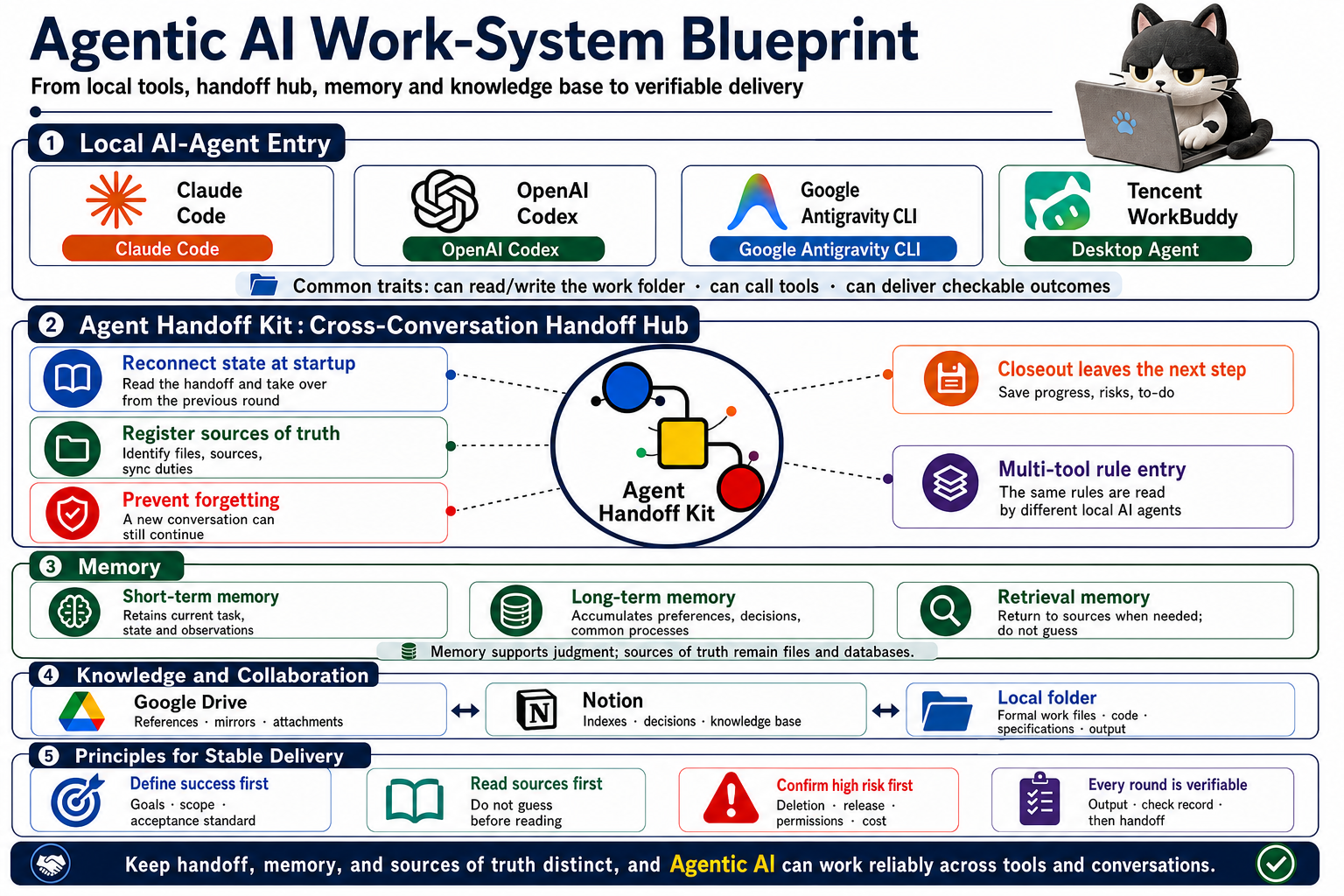
Agentic AI work-system blueprint
This diagram shows, in one page, how local AI agents connect to handoff, memory, knowledge collaboration, and acceptance.

The README teaches you how to use the Kit; this article explains the layer where Kit should sit.

If all you need is installation, startup, and closeout, then README, the 60-second intro, and the practical guide are enough. This article should not repeat those.

This article fills a missing architecture-level gap: when you start using local AI agents like Claude Code, OpenAI Codex, Google Antigravity CLI, or Tencent WorkBuddy, how should the whole method be layered so each new conversation does not become a fresh onboarding cycle full of re-explanations and ambiguity?

So Agent Handoff Kit is not the hero here, not a platform, not a memory database, and not a sync tool for Notion or Google Drive. It is the continuity-and-handoff layer in a complete local agentic AI work system: startup entry, current-state record, next step, risks, source-of-truth registry, rule entry points, safety boundaries, and closeout prompts are placed in project files. It is clear because it stays scoped to this layer only.

Agentic AI is a work system, not a chat mode.

When I first started using AI, I naturally treated it as a Q&A tool: type a question and wait for an answer. That is useful for lookup, sentence edits, and short tasks. Problems appear when work grows longer.

New conversations forget previous context. File versions drift. AI does not know which materials are source of truth, or which actions should be confirmed with me first. This is not only an efficiency issue; it is a real workflow risk.

So my current approach is to build an agentic AI work system first, then run AI inside that system.

Model, context, tools, rule/permission setup, memory, handoff, and acceptance together make a usable AI-agent workflow. The model is only one part. What truly stabilizes work is whether AI can proceed within the right data, tools, and boundaries while preserving a handover state for the next round.

Chat AI answers questions. Local AI-agent enters the project.

I prioritise AI agents that can read and write local folders, instead of only taking chat prompts in a web interface. Those tools may be Claude Code, OpenAI Codex, Google Antigravity CLI, or Tencent WorkBuddy. Tool names change, but I care about three shared abilities:

  • Read and write the project folder.
  • Call tools, such as search, file read, file edits, and checks.
  • Deliver inspectable work, not just produce plausible text.

This is the core difference between chat AI and local AI agents. Chat AI mostly answers inside the thread; a local AI agent enters a directory and understands files, specs, and project state.

Beginners do not need to begin with the most complex automation. A clear project folder where the AI always works can significantly reduce chaos immediately.

One practical AI problem: every new conversation forgets context.

In the previous round you may spend a lot of time explaining goals, files, rules, and preferences. In the next round, AI starts as if rejoining from scratch, asks the same questions, and sometimes repeats work. It wastes time and makes formal output unstable.

So I put Agent Handoff Kit in the center of the process. It is not replacing AI. It lets different local AI agents attach to one shared project state.

  • Startup entry: AGENTS, CLAUDE, GEMINI and START_NEXT_SESSION_PROMPT let different local AI tools find the same entry point.
  • Current state: handoff docs keep what was done, next actions, risks, and check results.
  • Source-of-truth registry: important files, external sources, sync responsibilities, and document roles are all registered clearly to avoid creating orphan files.
  • Rule entry: load only task-relevant work rules, such as writing, research, knowledge synthesis, release, or safety operations.
  • Trace and long-term decisions: short-term progress, long-term evolution, architecture tradeoffs, and important learnings no longer live only in chat history.
  • Safety guardrails: deletion, overwrite, release, permission, cost, and external write operations are blocked for explicit confirmation first.
  • Closeout handoff: at the end of each round, handoff files and next-start prompts are updated so the next AI tool can continue.

In practice, my habit is simple: say Start Agent Handoff at the beginning, and Wrap up Agent Handoff when ending the work round. Once an item is finalized—for example an official image, article, spec, or workflow—I ask AI to register it into Agent Handoff Kit.

Then the next AI does not rely on memory alone. It reads current state, index, rules, and handoff prompts directly from project files.

Memory is useful, but it does not replace source-of-truth.

Memory is necessary, but I do not treat it as truth. In general agentic AI, memory can be thought of in three layers: short-term memory for current work state and recent actions, long-term memory for preferences and repeated rules, and retrieval memory to confirm from files, databases, knowledge bases, or official sources when needed.

There is no need to bind this to one framework. A beginner should first separate three things: what the current conversation is handling, what is already confirmed in project files, and what exists in long-term knowledge. With those separated, AI is less likely to mix temporary assumptions, confirmed facts, and long-term preferences.

My principle is clear: memory supports judgment, but files, databases, official docs, and confirmed data remain the source of truth.

When AI says “I remember your preference,” treat it only as a prompt. For formal output, go back to source-of-truth checks.

Knowledge and collaboration layers should be separated

I split knowledge collaboration into three categories: Google Drive for references, attachments, mirrors and backup; Notion for index, decisions, knowledge base, and project dashboards; and local folders for source work files, code, specs, images, and outputs.

Do not mix these three. Local folders are best for active source-of-truth work because AI can read and write them directly for validation. Notion is best for human-readable indexing and knowledge accumulation. Google Drive is best for references, attachments, and cross-device retention.

AI should connect to external resources and tools where permission and boundaries allow. But connectability does not equal open-write. External platform writes, deletion, release, permissions, and cost changes always require confirmation.

I do not treat “AI answered” as delivery.

In my workflow, each task ends in output validation. I check: is it inspectable, does the file exist, can the source be traced, and can the next round continue?

Define success first

Before starting, define goals, scope, and acceptance criteria clearly. Avoid “please help me organise this.” Better is: “Turn this into a beginner-friendly article, keep my voice, but make the method general and checkable.” AI needs a destination, otherwise it produces output that looks good but cannot be accepted.

Read source of truth first

If files exist, read them; if official docs exist, read them; if there is a dashboard, query it first. Do not guess when unread. If not verifiable, state that explicitly. The biggest AI risk is not not being able to write. It is writing fluently without verification.

Confirm high-risk actions first

Deletion, overwrite, release, permission, cost, and external write actions must all be confirmed first. The local AI agent is powerful because it can act. That is why guardrails are required.

Each round should leave an acceptance point

Every round should produce a checkable result: file created, image correct, content placed in the designated path, handoff state updated, and next action documented. Only then is work done in a real system rather than only in conversation.

Connector, plugin, skill, and MCP are tool-access layers, not the core product definition.

Local AI agents usually need tool access, data connections, and reusable methods. A connector connects external services. A plugin brings in a capability set. A skill saves reusable practice. MCP provides a standard interface for AI tool/resource usage. They are important, but they are not Agent Handoff Kit’s product identity.

My division is this: tools enable actions, governance enables stable actions, and Agent Handoff Kit keeps state, source-of-truth, rules, safety boundaries, and next-start guidance in project files.

So those elements belong to a tool and permission layer: what can be read, what tools can run, what needs confirmation, and what results must be written back to source-of-truth. Do not merge external tools, memory, sync, and handoff into one simply because AI can call tools.

Make each task a loop

I treat one AI task as a loop: define scope, read source-of-truth, act with tools, inspect outcomes, accept, then hand over next steps. That is loop engineering: not requiring a one-shot perfect answer but creating a system that supports repeated observation, correction, and acceptance.

Current harness-oriented thinking follows the same direction: do not look only at model quality. Look at how model, tools, permissions, memory, observation, failure attribution, human intervention, and acceptance combine in a working system. For individuals, you do not need a big platform first; a clean folder setup, source-of-truth registry, tool permissions, handoff, acceptance criteria, and high-risk confirmation are enough.

Acceptance should be multidimensional

Smooth text does not equal completion. Before formal delivery, I check target fit, source-of-truth reads, file and link presence, visual usability, and high-risk confirmation. The next step is not a delivery detail alone; it is the continuity information that must remain at closeout.

This is not a corporate slogan. It is day-to-day operational scope: what AI can read, what AI can modify, what AI can call, when it must stop, how acceptance is done, and how state is handed to the next session.
At the beginning, you do not need a complex system.

You can start with this minimum setup:

  1. Create one dedicated work folder.
  2. Put references, images, drafts, and outputs into the same folder.
  3. Install Agent Handoff Kit. Beginners can first read the installation prompt, then ask AI to install or upgrade in the current folder.
  4. When starting a task, say Start Agent Handoff.
  5. When finishing an important work round, say Wrap up Agent Handoff.
  6. Register official deliverables as source-of-truth, for example: Bring docs/xxxx.md into Agent Handoff Kit.
  7. If you are not sure which important files are not yet integrated, say: Scan for important documents not integrated with Agent Handoff Kit. This helps when adding many files, before changing AI, before release, or when cleaning old work.
  8. Ask AI to read source-of-truth before touching files: Read README, HTML, Markdown, and Notion DB first; propose a plan only after reading, not by guessing. If you are unsure of sources, ask: “Tell me what you plan to read first, then start only after it is read.”
  9. Publish, delete, and external write actions require explicit confirmation, including impact scope, rollback plan, and acceptance method.

Once this is in place, AI is no longer only a chat utility; it is an assistant that can carry work from session to session.

Stable AI work is not built on one brilliant response. It is built on tools, context, memory, source-of-truth, guardrails, and handoff working together.

These are the reminders I keep using.

  • Set up environment and tools before asking AI to act.
  • Read sources of truth first; do not rely on impressions.
  • Memory is support, not truth.
  • Connector, plugin, skill, and MCP are the tool-access layer, not the handoff layer.
  • Perform multidimensional acceptance each round: text, sources, links, files, visuals, safety.
  • Pause before high-risk operations and list impact, recovery plan, and required confirmation.
  • Each closeout should leave a clear next step: what to read first, what to do next, which risks remain.
  • The output should be directly usable by the next AI.

Understand the method first, then move back to tools.

This article explains why a local AI-agent workflow needs folder structure, source-of-truth, handoff, memory boundaries, and acceptance when you use local AI seriously. To use Agent Handoff Kit in practice, return to intro, guide, and GitHub README.